
You’re a diligent website owner, dedicated to providing your visitors with the best online experience. One day, you log into your Google Search Console (GSC) to ensure that everything is running smoothly. To your surprise, you spot a mysterious 404 error reported by Google for a page that, as far as you know, never existed on your website. Confusion sets in. How is it possible to have a 404 error for a page that was never there in the first place?
This scenario may seem baffling, but it’s a common issue that many website owners encounter. In this article, we’ll unravel the mystery behind Google Search Console reporting 404 errors for non-existent pages. We’ll dive into the technical intricacies of how Google detects and reports these errors, explore potential explanations for this phenomenon, and provide you with valuable insights to manage and prevent such incidents in the future.
Understanding 404 Errors
Before we delve into the enigma, let’s ensure everyone is on the same page regarding what a 404 error actually is. In the realm of the web, a 404 error, or “Not Found” error, is a standard HTTP response code indicating that the server couldn’t locate the requested webpage. In simpler terms, it’s the digital equivalent of a dead-end road sign. When a user attempts to access a page on your website that no longer exists or has been moved, the server returns this response, signaling that the page is nowhere to be found.
Google Search Console: A Brief Overview
Google Search Console, formerly known as Google Webmaster Tools, is a free web service provided by Google. It offers a collection of tools and reports that help website owners monitor and optimize their websites’ performance in Google’s search results. Essentially, it’s your backstage pass to the inner workings of Google’s search index as it pertains to your website.
Website owners and marketers use Google Search Console to gain insights into how Googlebot (Google’s web crawling bot) views their sites, identify indexing issues, analyze search traffic data, and receive important alerts and messages from Google regarding their websites’ health and performance.
The Mysterious Case: A 404 Error for a Nonexistent Page
Now, let’s address the perplexing issue at hand. You log into your Google Search Console account, expecting to see the usual metrics and reports. Instead, you’re greeted with an unexpected notification—an alert about a 404 error for a specific page on your website. The catch? This page never existed on your site, at least not intentionally. You rack your brain, trying to recall any recent website changes or updates that might explain this error. Still, you come up empty-handed.
Naturally, you’re puzzled and perhaps a bit frustrated. How can Google report a 404 error for a page that was never there in the first place? Rest assured, you’re not alone in this predicament. Many website owners have faced similar scenarios, and there are logical explanations behind these mysterious 404 error reports.
Digging Deeper: Possible Explanations
To demystify this issue, let’s explore some of the possible explanations for why Google Search Console might report a 404 error for a page that you believe never existed on your website:
1. Old Pages Stuck in Google’s Memory
Imagine your website as a big book, and Google as a tiny robot that reads every page in that book. This robot helps Google understand your website better. However, sometimes, you might have had pages on your website in the past, but you deleted or changed them. The problem is, Google’s robot still remembers those old pages and tries to find them, even though they’re no longer there. It’s like searching for a book in your library that you lent to a friend, but you forgot you lent it out.
The more official term for this is that there is a “cached version of an old page.” In other words, Google’s search index may still have cached versions of pages that you’ve since deleted or renamed. These cached versions could resurface in search results, triggering 404 errors when users attempt to access them.
Honestly, this is one of the most common reasons we see 404 errors. For example, if you have a clinician at your practice who had an “about” page and then they leave your practice. What do you do? Perhaps you delete the page. Now, Google still remembers that page exists. So, for awhile it could still show up in search results, but when someone clicks on it, they’ll get a 404 error.
For this, there’s an easy fix. It’s generally recommended that if you delete a page of your website, you immediately create a redirect so that they’ll go instead to a different page of your website. In the example of a former clinician who has left your practice, you can redirect that old page to instead go to your general “about the team page.”
2. URL Variations and Parameters: Why Is Googlebot Confused?
Okay, imagine your website’s address is like your home address. Sometimes, when you order stuff online or share your address with friends, you might add extra details, like “Apt. 3B” or “Blue House.” These extra details are like URL parameters for websites. They help track things or make special features work.
Now, think of Googlebot as a friendly explorer. It loves visiting websites to learn new things. But sometimes, it gets a little too curious. It might try to visit web addresses with those extra details (URL parameters) that you never meant for people to see. It’s like someone (in this case Google’s bots) exploring parts of your neighborhood that aren’t really meant for visitors. When Googlebot visits these secret spots, it gets confused because they weren’t supposed to be public. So, it tells you there’s an error, even though nothing’s really wrong with your main place (website).
3. Web Scrapers and Bots: The Sneaky Collectors
Now, think of web scrapers and bots like little robots on the internet. They’re like Wall-E, the cute robot who collects things in the movie. These internet robots go around gathering information from websites. They might see words on your website and decide to make up their own web addresses. But sometimes, they make mistakes, just like when you try to build a tower of blocks, and it falls down.
So, these little robots might create web addresses (URLs) that don’t really exist on your website. It’s like them trying to put together words they found on your site and making a new address. When people or other bots try to visit these made-up addresses, they can’t find anything because those pages don’t really exist. That’s when they get a 404 error message, which is like saying, “Oops, this page isn’t here.”
What Can You Do About 404 Errors for Nonexistent Pages?
If you come across this 404 error on your website, don’t panic. It’s a common issue, and you’re not alone. Here’s what you can do:
1. Check Your Website Content:
Go through your website and ensure that all your pages are up to date and relevant. If you have old pages that you no longer need, consider removing or redirecting them to the right pages.
2. Use Redirects:
To prevent users from seeing 404 errors, you can set up redirects. This means if someone tries to visit a page that doesn’t exist, they’ll automatically be taken to a relevant page. Think of it as putting up a sign in your library that directs people to the right section when they can’t find a book.
3. Regularly Update Your Sitemap:
A sitemap is like an index for your website. It tells Google where to find all your pages. Keeping your sitemap updated helps Google understand your website better and reduces the chances of 404 errors.
4. Regular Website Audits
Regular check-ups for your website are super important! It’s like going to the doctor for your site. These check-ups, called audits, help find and fix any problems like broken links or pages that got lost. But don’t worry, you don’t need fancy tools for this – your friendly website expert can do it. And guess what? If you’re working with us, our SEO packages include these check-ups! You’ll see them on your special data dashboard. It’s like having a health report for your website, making sure it’s in tip-top shape!
5. Seek Professional Help From an SEO Agency in Your Niche/Field:
If you’re not comfortable dealing with these technical aspects, consider hiring a web developer or an SEO expert. They can help you identify and fix 404 errors and ensure your website runs smoothly.
Wrapping Up: Navigating 404 Errors on Your Website
In the world of websites, even the pros sometimes get puzzled by 404 errors. It’s completely normal to find this confusing at first. But remember, as a healthcare business owner, you’re a pro at what you do, and you can master this too! So, let’s recap: 404 errors happen for various reasons, like typos or web crawlers gone wild. To fix them, keep an eye on your site, regularly check for broken links, and don’t hesitate to ask for help if needed. You’ve got this! Your website will be running smoothly, helping more patients find you in no time. Keep up the great work!
Professional, Support SEO Help for Private Practices
If you’re a healthcare professional running a therapy or private practice and want to boost your online visibility, Simplified SEO Consulting is here to help. Our team specializes in crafting tailor-made SEO strategies to attract your ideal clients or patients. Say goodbye to 404 errors and hello to a thriving online presence!
With our expertise in the healthcare industry and digital marketing, we’ll guide you through the complexities of SEO, making it easy to understand and implement. Our SEO packages include regular website audits, ensuring your online presence remains top-notch.
Don’t let 404 errors or technical jargon hold you back. Let’s work together to grow your practice and reach more of those who need your services. Schedule a free consultation with us today, and let’s get started on your path to online success. Your ideal clients are just a click away!
 In the vast and ever-evolving realm of digital marketing, SEO (
 On-Page SEO Vocabulary
 NAP (Name, Address, Phone Number): Basic business information like hours, locations, addresses, etc. that must be consistent and accurate across various online platforms, directories, and websites
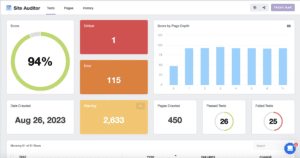 Classifying Your Site Audit Results
 While knowing the cause of each issue is invaluable, it still may not be worth the time to go through and fix every single warning, error, and critical error on the site. There are many different unique warnings and errors that may occur on your site, so we won’t be addressing every issue in this post. Each concern has a description of why the error/warning is occurring, so making use of that resource will be important when reviewing your site audit.
  In short, it’s not that simple. As a general rule, yes it will be best to fix all critical errors that occur on your site audit. But, there are also some errors that may need to be addressed like broken resources. In the end, it is worth taking your personal situation into account so you can effectively use your time to address the issues that affect your site most.










 Emails like this are common, so you may get them before you have done any SEO. A large number of these are often
  So you’ve received an email telling you what is wrong with your SEO. It’s best to ignore it, right? In most cases, yes. But, you can still use this as a chance to reflect on what elements of your SEO strategy are contributing to your
  Messages may include references to how low your rankings are and how they can support you to improve them. Emails may seem more urgent and warn of something you’re doing wrong. For example, you may receive an email that tells you how your SEO is suffering due to not having enough backlinks. In an event like this, they may suggest that you purchase links through them in order to help improve your SEO. However, the links you would likely receive from something like this are more than likely going to be scammy, and not the high-quality links that will help your practice. In a case like this, it is actually seen as an




 Jessica Tappana is a private practice owner herself as well as the founder of Simplified SEO Consulting. Additionally, she is an SEO consultant specializing in helping healthcare professionals, private practice owners and therapists rank higher in search engine results. The team around her is just as important to her as the work they do. The collaboration between the team and the clients helps create a sense of trust and hard work that fuels Jessica to constantly grow and help as many clients as she can.


 About the Author: